Cricbet99 App Download — The Honest Answer
Straight up: there is no Play Store app, and random "cricbet99.apk" files are a security risk. The exchange runs brilliantly in your mobile browser — and a five-second trick puts it on your home screen like a real app. Here's the safe setup.
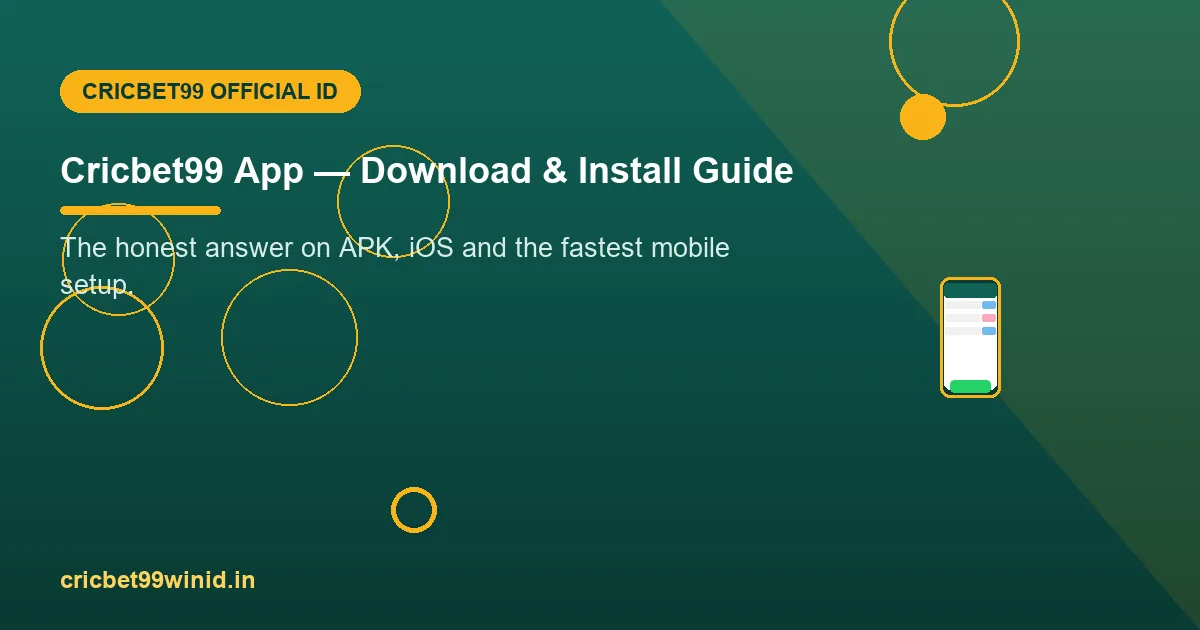
Mobile Setup in 3 Steps
Get your ID on WhatsApp
One ID works on every device — phone, tablet, desktop. Registration takes two minutes.
Open the official link in Chrome
The exact link from your chat — then menu → Add to Home Screen for an app-style icon.
Login and play
Full exchange, sessions, casino — everything loads in the browser at full speed.
The APK Reality Check
Sites offering a "Cricbet99 APK latest version" are repackaging a web view at best — and at worst bundling spyware or a fake login screen that steals credentials. None are official.
- No official APK exists. Anyone claiming otherwise is unofficial by definition.
- Your credentials are the target. A fake app's login page sends your password to its operator — the exact risk covered in our login safety guide.
- The browser is genuinely better. Instant updates, no permissions, nothing to uninstall, works identically on Android and iPhone.
If you've already installed a random APK: uninstall it, then reset your password via the official chat.
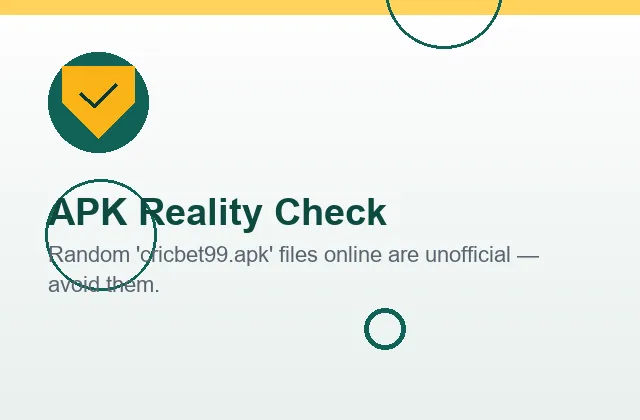
The Mobile Panel, Screen by Screen
The preview beside this text is the browser panel that replaces an app — and walking through it screen by screen shows why nothing is missing from the "no app" experience.
The home board. Live and upcoming matches with in-play indicators and headline back/lay prices — the same board a desktop shows, reflowed for a thumb. Scrolling is native browser scrolling, which on a modern phone is smoother than most webview-wrapped "apps" manage.
The match view. Tap a fixture and the full market board opens: match odds ladder on top, session lines beneath, fancy markets below that. Prices update ball by ball over the same connection an app would use — the data feed is identical; only the wrapper differs. Bet slips slide up from the bottom exactly as app-native sheets do.
Account and history. Balance, open positions and the complete bet log sit one tap away. The log is the same authoritative record described in how it works — every market, price, stake and settlement, scrollable on the train home.
The one real difference. An installed app can send push notifications; a browser panel doesn't. In this ecosystem that is a feature: no betting notifications on your lock screen, nothing visible in an app drawer, total discretion on a shared or workplace phone. The players who most value privacy consider the missing pushes the best part of the deal.
Add the home-screen icon and the distinction disappears entirely: full-screen launch, no browser chrome, indistinguishable from an installed app in daily use — with instant updates every time the panel improves, no store approval cycle in between.
Why "0 MB" Is a Feature, Not a Compromise
The zero beside this text deserves its own argument, because players conditioned by app stores assume "no download" means "lesser product". The opposite is true here, for four concrete reasons.
Security surface. Every installed APK carries permissions, storage access and update authority. A browser tab carries none — the panel cannot read your contacts, your photos or your other apps, because the browser sandbox forbids it. In a category plagued by fake APKs, the safest install is no install.
Storage and performance. Betting apps balloon past 100 MB with cached data; the panel occupies rounding-error space and shares Chrome's already-warm engine. On the 3-year-old budget Android that half of India actually uses, the browser panel outperforms wrapped apps convincingly.
Update integrity. Panel improvements deploy server-side and reach you instantly — there is no version drift, no "please update to continue", and critically no window where an outdated client shows stale prices. Every player is on the current version every ball.
Portability. Phone lost or reset? Your ID lives on the panel, not the device — sign in from any browser and everything is exactly where you left it, as the login guide covers. An app model ties access to an install; this model ties it to your credentials, which is where it belongs.
The Complete Home-Screen Setup, Both Platforms
Android (Chrome) — 5 steps, 20 seconds
1. Open your official panel link from the WhatsApp chat in Chrome. 2. Log in once so the session is saved. 3. Tap the three-dot menu, top right. 4. Choose Add to Home Screen and confirm the name. 5. Launch from the new icon — full screen, no address bar, app-identical. If the icon ever opens a dead domain after a rotation, delete it and repeat with the current link from chat.
iPhone (Safari) — 5 steps, 20 seconds
1. Open the official link in Safari (the share sheet requires Safari, not Chrome-on-iOS). 2. Log in once. 3. Tap the Share square-and-arrow icon. 4. Scroll to Add to Home Screen, confirm. 5. Launch from the icon. iOS treats these web apps as first-class citizens — full screen, its own app-switcher card, indistinguishable from the App Store variety.
One habit completes the setup on either platform: when the panel domain rotates — a normal event in this ecosystem, explained in the login guide — refresh the icon with the new link rather than searching for one. The icon is a bookmark in costume; keep the bookmark honest and the costume never matters.
Data, Battery and Older Phones — the Practical Numbers
Data usage. A full evening of in-play betting — three hours of live ladders — consumes roughly the data of ten minutes of standard-definition video. Price updates are tiny text payloads, not streams. On a 1.5 GB/day plan, the panel is statistically invisible, and it degrades gracefully on 3G: prices keep flowing when video apps have long since buffered out.
Battery. The panel renders text and numbers, not video or 3D — screen brightness will cost you more than the site does. Practical tip for marathon Test sessions: lower brightness and let the screen sleep between overs; positions and balance live server-side, so nothing is lost when the screen darkens.
Old and low-RAM phones. The panel runs comfortably where heavyweight apps stutter. Two settings help on genuinely old devices: keep no more than a handful of other tabs open, and use Chrome's "Lite mode" if bandwidth is the constraint. Players on five-year-old handsets routinely trade the death overs without a hiccup.
iPhone specifics. Safari runs the panel identically; Share → Add to Home Screen gives the same full-screen icon experience as Android. There is no TestFlight build, no sideload profile, no "enterprise certificate" — anyone offering an iOS install file for this platform is offering malware, the same credential-theft risk as the Android APKs, wearing an Apple costume.
App & APK FAQs
Is there an official Cricbet99 app on the Play Store?
No. Real-money betting apps for Indian users are not distributed through the Play Store or App Store. Cricbet99 runs as a fast mobile web panel that works in any browser — no download needed.
Where can I download the Cricbet99 APK?
Be careful: APK files on random sites are unofficial repacks and can carry malware or phishing login screens. Your ID works perfectly in the browser; if you want an icon, use Add to Home Screen — it takes five seconds.
How do I get the app feeling on Android?
Open your official panel link in Chrome, tap the three-dot menu, choose "Add to Home Screen". You get a full-screen icon-launched experience identical to an app — with zero installation risk.
Does it work on iPhone?
Yes — Safari, same panel, same markets. Use Share → Add to Home Screen for the icon. Every feature including live casino works.
Will the mobile version have all markets?
Yes. Match odds, sessions, fancy and casino are all present — the phone layout is actually how most Cricbet99 players use the exchange daily. See the feature list.
My friend sent me a Cricbet99 APK that "works fine". Should I use it?
No — "works fine" is exactly how credential-harvesting apps behave until they don't. The app shows the real panel in a webview while logging what you type. Your friend isn't lying about the experience; the risk is invisible by design. Browser plus home-screen icon gives the identical experience with none of it.
Does the panel work on tablets and desktops too?
Yes — same login everywhere. Tablets get the phone layout scaled up; desktops get the full wide board. Many players run a laptop during big matches and keep the phone for the WhatsApp chat, which is the ideal two-screen setup.
Why is there no official app if the platform is legitimate?
Store policy, not legitimacy: Google and Apple do not distribute real-money betting apps for the Indian market. Every operator in this category faces the same wall, which is why the serious ones build excellent browser panels and the careless ones push risky APKs. The absence of an app is the ecosystem's shape — the presence of an APK is the red flag.
Will the home-screen icon disappear or break?
It persists like any app icon until you remove it. If the panel domain rotates, the icon may need refreshing with the new link from your chat — a ten-second job covered in the login guide. Your ID and balance are never affected by any of this.
How much data does live betting actually use?
Around 30-50 MB for a full evening of in-play trading — comparable to a few minutes of video. The panel sends price ticks, not streams. If you can load WhatsApp, you can trade the death overs.
Can I get notifications for matches without an app?
For match alerts, any cricket score app fills the gap without touching your betting setup — most players pair one with the panel. For account events that matter (payout confirmations, ID notices), the WhatsApp chat is itself the notification channel, and it is the one channel worth having on your lock screen.
Is the browser panel slower than a real app would be?
Measured honestly: no. The panel's payload is text and numbers over the same connection an app would use, and modern mobile browsers execute it at native-feeling speed. The slowest thing in any betting stack is the network during a stadium-crowd traffic spike — and that bottleneck hits apps and browsers identically.

Skip the Download. Start Playing.
Your mobile-ready ID is one message away — works on the phone in your hand right now.
Get Cricbet99 ID on WhatsApp